

WordPress offers tools that simplify every step of content marketing – from planning and creation to optimization and distribution. These tools integrate directly into your WordPress dashboard, saving time and streamlining workflows. Key plugins like Yoast SEO, PublishPress, and PushEngage help optimize content, manage schedules, and enhance audience engagement.
Key Takeaways:
- Site Setup: Use managed hosting, SSL, caching, and image optimization for fast, secure websites.
- SEO Tools: Plugins like AIOSEO, Yoast, or Rank Math optimize search visibility.
- Editorial Workflow: Tools like PublishPress Planner organize schedules and manage team roles.
- Content Distribution: Integrate email marketing (e.g., Mailchimp) and social scheduling tools (e.g., Buffer) for wider reach.
- Analytics: Use Google Analytics 4 and MonsterInsights to track performance and refine strategies.
For businesses or teams seeking custom solutions, services like WP Support Specialists can handle technical setups, security, and custom workflows, enabling marketers to focus on strategy. Start with essential plugins, expand gradually, and use analytics to guide decisions.
WordPress Content Marketing Toolkit: 5 Essential Pillars for Success
Setting Up WordPress for Content Marketing
Site Optimization Basics
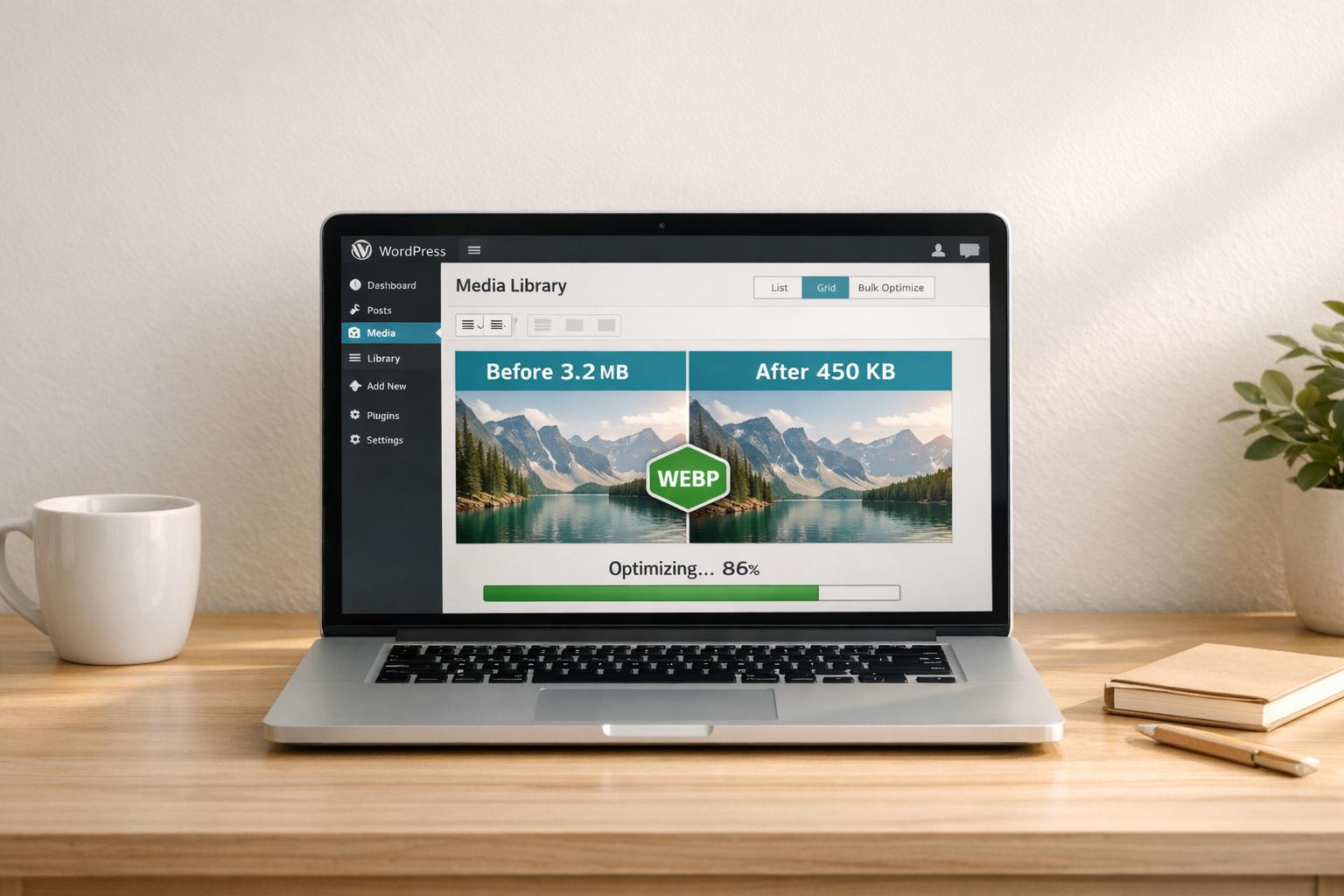
Before launching your first campaign, it’s crucial to ensure your WordPress site has a strong technical foundation. Start by choosing managed WordPress hosting that supports PHP 8+, guarantees at least 99.9% uptime, and includes server-side caching to handle traffic surges when your content gains traction. Make sure your site uses HTTPS by installing an SSL certificate – this not only improves security but is also a ranking factor that builds trust with U.S. audiences. Add a caching plugin (if not already included) and an image optimizer to convert files to WebP format, helping you keep page load times within the ideal 2–3 seconds. Faster load times mean better SEO rankings and a smoother experience for your readers.
Next, set a clean and simple permalink structure, such as /%postname%/, to create keyword-rich, user-friendly URLs. Choose a lightweight, mobile-responsive theme that supports the block editor and meets accessibility standards. Proper heading structure and sufficient color contrast are essential for both usability and search engine visibility. Install essential plugins like an SEO plugin (e.g., AIOSEO, Yoast SEO, or Rank Math) to manage titles, meta descriptions, and sitemaps. Add an analytics plugin, such as MonsterInsights, to monitor site performance, and a security plugin to protect against malware and other threats. Keep your plugin list minimal by auditing it regularly and removing any unused tools to avoid slowing down your site.
Once your site is technically optimized, set up user roles to maintain a secure and efficient collaboration process.
Setting Up User Roles and Permissions
With your site running smoothly, the next step is managing access to ensure content quality and security. WordPress user roles are a great way to balance collaboration with control. Reserve Administrator access for technical owners who handle hosting, core settings, and overall site management. Assign the Editor role to content managers responsible for approving drafts, scheduling posts, and managing other contributors. Regular contributors can be given the Author role, allowing them to create and publish their own content without editing others’ work. For guest writers or freelancers, the Contributor role is ideal – they can submit drafts for review but cannot publish directly.
For larger teams, consider using a workflow plugin like PublishPress to create custom roles, such as "SEO Editor" or "Copy Editor", with specific permissions tailored to your needs. To enhance security, enable two-factor authentication and require strong passwords, especially for those with Administrator or Editor access. When working with outside agencies or contractors, grant them only the access they need and set clear start and end dates for their accounts. This approach ensures smooth collaboration while protecting your site from accidental changes or security breaches.
How WP Support Specialists Can Help
If managing the technical side of WordPress feels overwhelming, WP Support Specialists can step in to handle it for you. They take care of the entire technical setup, allowing your marketing team to focus on creating and executing content strategies without worrying about troubleshooting. Their security services include regular audits, malware scans, backups, and updates to keep your site stable, even during high-traffic campaigns.
For businesses with unique needs, they can develop custom plugins and workflow solutions to simplify content production and distribution. They also offer migration services to seamlessly transfer content from other CMS platforms into WordPress, ensuring SEO value and URL structures remain intact. This is especially critical for U.S. businesses that rely heavily on organic traffic. Agencies managing multiple WordPress sites can also benefit from their white-label services, allowing them to provide backend support for clients while maintaining their own branding. This combination of technical expertise and tailored solutions ensures your content marketing efforts run smoothly from start to finish.
Content Planning and Workflow Tools
Editorial Calendar and Workflow Management Tools
Visual editorial calendars are a must-have for keeping content marketing efforts organized and efficient. One standout option is PublishPress Planner (formerly PublishPress), a WordPress plugin designed for teams juggling multiple authors and intricate workflows. It features a drag-and-drop calendar view, custom post statuses like "Pitch", "In Review", or "Ready to Publish", and automated email notifications to keep everyone on track as posts move through different stages. This tool is particularly useful for multi-author blogs and content teams that need a clear overview of assignments and deadlines. It offers both free and paid plans for added flexibility.
For smaller teams or solo creators, Strive Content Calendar provides a simplified interface that focuses on pipeline tracking and post checklists. With color-coded statuses and the ability to schedule revisions directly in the WordPress dashboard, it makes managing content straightforward. Like PublishPress Planner, Strive integrates seamlessly with WordPress and works alongside popular SEO plugins like AIOSEO or Yoast, allowing users to manage optimization tasks directly within their editorial workflow.
If your content strategy includes social media promotion, consider a tool that combines editorial planning with social scheduling. This is especially helpful for U.S.-based marketing teams running campaigns around key holidays like Memorial Day or Black Friday, where timing is everything. Start by solidifying your internal workflow with a reliable tool, then expand to include social and distribution features as your content strategy grows.
These tools provide a strong foundation, but it’s crucial to ensure the features align with how your team operates.
Workflow Tool Features Checklist
When choosing a workflow tool, look for a drag-and-drop calendar that displays posts in the MM/DD/YYYY format. The ability to create custom post statuses tailored to your process – like "SEO Review", "Legal Review", or "Stakeholder Approved" – is essential. This flexibility prevents your team from being forced into generic workflows. Role-based permissions are another must-have, ensuring that only editors or managers can publish content, while authors can focus on drafting without the risk of accidentally publishing.
Automated notifications can help your team stay on schedule, regardless of time zone differences across the U.S. Integrations with SEO plugins like Yoast or AIOSEO, as well as analytics tools like MonsterInsights, allow you to view performance data and optimization tasks alongside your editorial calendar. This ensures your planning is backed by real insights. Additionally, including task checklists and content briefs within posts can centralize important details like target keywords, word count, and linking requirements, reducing email back-and-forth and minimizing errors.
For teams with more intricate needs, off-the-shelf tools might not be enough.
Custom Workflow Solutions
While standard plugins work well for most teams, organizations with complex approval processes, compliance requirements, or the need to integrate WordPress with internal systems may benefit from custom workflows. Large enterprises often require advanced features like tailored approval chains, automated audit logs, and integrations with CRMs, marketing automation tools, or project management systems. At this level, generic tools can slow things down, making custom solutions a time-saving and error-reducing alternative.
WP Support Specialists can design custom workflows that cover every step of your process, from ideation to performance review. They can develop or modify plugins to include advanced workflow logic, such as automatic status changes triggered by specific actions or timelines. They can also build integrations with external systems like CRMs, email marketing platforms, or project management tools. For example, moving a post to "Approved" could automatically create a task in your project management software or schedule a social media promotion. Conditional notifications can also be set up to ensure stakeholders only receive relevant updates, tailored to their roles and time zones. Training is provided so your team can adapt the workflow as processes evolve. Custom workflows not only streamline operations but also improve content performance across all channels.
Content Creation and SEO Tools
Content Drafting and Editing Tools
Creating content that grabs attention and ranks well requires the right tools. The Gutenberg block editor simplifies the process by offering a code-free way to build content using customizable blocks. These blocks cover everything from paragraphs and images to buttons, columns, and embeds, making it easy to create polished layouts. U.S.-based teams can use this block-based system to standardize key sections, like author bios or call-to-action areas, ensuring brand consistency across campaigns without extra hassle.
For more intricate designs, third-party block libraries like Kadence Blocks, Spectra (formerly Ultimate Addons for Gutenberg), and Stackable come in handy. They provide marketing-focused elements such as pricing tables, testimonials, feature grids, and conversion-friendly hero sections. These tools are perfect for crafting landing pages tailored to U.S. audiences, complete with social proof and comparison tables. Plus, they ensure your designs look great on any device. You can even save high-performing sections as reusable patterns and test different versions to improve click-through and conversion rates. Once the layout is solid, SEO tools step in to maximize visibility.
SEO Plugins for WordPress
When it comes to optimizing your site for search engines, plugins like AIOSEO, Yoast SEO, and Rank Math are invaluable. These tools handle key tasks like editing titles and meta descriptions, creating XML sitemaps, and analyzing content.
- AIOSEO is beginner-friendly, making it ideal for small to mid-sized businesses. It includes features like a Headline Analyzer and Link Assistant to help improve headlines and identify content that lacks internal links. Its schema and local SEO options are particularly useful for businesses targeting U.S. customers. WPBeginner even calls AIOSEO:
your best choice for getting your content to rank higher in search results.
- Yoast SEO uses a traffic-light system to guide writers on readability and SEO best practices. It evaluates sentence length, paragraph structure, passive voice, and more. The free version is great for getting started, while the premium version adds advanced features like multiple focus keywords, internal linking suggestions, and a redirects manager.
- Rank Math offers robust features – like schema markup, redirections, and a 404 monitor – even in its free version. It’s a favorite among data-driven marketers, thanks to its detailed schema options and seamless integration with Google Search Console. The Pro version takes it up a notch with AI-powered suggestions, enhanced keyword tracking, and additional schema types.
To choose the right plugin, list your must-have features – whether it’s local SEO, WooCommerce support, or detailed content analysis – and compare them against each plugin’s strengths. Once you’ve picked one (only run one SEO plugin at a time), set up basics like your site title, XML sitemaps, breadcrumbs, and index/noindex rules. For each new post, use the plugin’s tools to select a focus keyword, optimize your SEO title (50–60 characters), write a meta description (150–160 characters), and add schema markup to improve search visibility.
Readability and Grammar Tools
After crafting and optimizing your content, it’s time to fine-tune the text. Readability tools like Grammarly and Hemingway Editor are perfect for this stage.
- Grammarly integrates directly into WordPress’s block editor, catching grammar, spelling, tone, and punctuation issues as you write. The free version covers the essentials, while Grammarly Premium offers advanced suggestions to enhance tone, clarity, and style.
- Hemingway Editor simplifies complex sentences, reduces passive voice, and ensures your content is easy to read – aiming for a 6th to 8th-grade reading level, which works well for U.S. audiences. It highlights areas for improvement and assigns a readability grade, making it easy to spot and fix problem areas.
Many SEO tools, like Yoast, also include built-in readability scores to guide you on sentence length, paragraph structure, and subheading use. Establishing house rules – like keeping sentences under 20 words and limiting paragraphs to three or four lines on desktop – can help make your content more engaging and easier to scan, all while optimizing it for search engines. These tools work together seamlessly to ensure your content is polished, clear, and ready to perform.
Top 5 FREE SEO Tools for WordPress
sbb-itb-976b402
Content Distribution and Automation Tools
Once you’ve optimized your content, the next step is ensuring it reaches your audience efficiently. Automation tools can help distribute your WordPress posts across email, social media, and push notifications. This saves time, keeps your messaging consistent, and broadens your reach by handling repetitive tasks. Here’s how email, social media, and push notifications can streamline your content distribution process.
Email Marketing and Automation
Email continues to be one of the most reliable ways to share content, and WordPress makes it easy to integrate with popular email marketing platforms. Tools like Mailchimp for WordPress (MC4WP) and Sender allow you to embed signup forms directly into your posts, sidebars, or even as exit-intent popups, making it simple for visitors to subscribe without leaving your site.
With these tools, you can set up an RSS-to-email campaign to automatically send new blog posts to your subscribers as soon as they’re published – or on a schedule that matches your audience’s preferences. Beyond just sharing new posts, you can use email platforms to create drip campaigns, send welcome series, and, if you’re using WooCommerce, even recover abandoned carts with targeted emails.
When selecting an email platform, look for features like seamless WordPress integration, flexible automation workflows, audience segmentation, and compliance tools like double opt-in and easy unsubscribe options to meet U.S. CAN-SPAM requirements. Many platforms offer free plans based on subscriber limits or email quotas, with paid plans available as your list grows. Tracking metrics like open rates, click-through rates, and revenue per email can help you refine your strategy. For example, A/B testing subject lines or experimenting with send times (e.g., 10:00 AM vs. 3:00 PM Eastern) can reveal what works best for your U.S. audience.
Social Media Scheduling Tools
Social media scheduling tools like Buffer and OneUp make it easier to manage posts across multiple platforms. These tools let you queue content in advance, all from one dashboard, and support major networks like Facebook, X (formerly Twitter), LinkedIn, and Instagram. They can also be connected to WordPress via plugins, RSS feeds, or automation services like Zapier.
For example, when you publish a new blog post, an automation can pull the title, featured image, and URL to create tailored social posts for each platform. You can adjust the text to fit the style of each network – short and snappy for X, image-heavy for Instagram, and more detailed for LinkedIn – while still using templates to save time. By scheduling posts at times when your U.S. audience is most active (e.g., 9:00 AM, noon, and 3:00 PM Eastern), you can maximize visibility without extra manual work.
Many tools also support evergreen content recycling, which allows you to reshare your most valuable posts over time, extending their reach. Built-in analytics can show you which posts are driving the most traffic back to your site. For even more automation, platforms like IFTTT (starting at $2.99/month) and Zapier can connect WordPress to other apps, enabling you to trigger social posts, email campaigns, or CRM updates with a single click when you publish new content.
Push Notifications for Content
Push notifications offer another direct channel to re-engage your audience when new content is published. Tools like PushEngage integrate with WordPress to send browser and mobile notifications, even when users aren’t actively browsing your site. Pricing starts at $8/month, with a free plan available for basic use.
Once you install PushEngage, visitors can opt in to receive notifications. You can then automatically send alerts for new posts or specific categories, segment subscribers based on behavior (like pages visited or interests), and schedule notifications during peak U.S. business hours. Limiting notifications to one or two per day ensures you’re focusing on high-value updates – like major guides, promotions, or breaking news – without overwhelming your audience.
Coordinating push notifications with email and social media posts can create multiple touchpoints without duplicating efforts. For instance, you might send an email at 9:00 AM Eastern, a push notification at noon, and stagger social posts throughout the afternoon. Offering options for subscribers to choose what types of notifications they want – like "New blog posts", "Deals", or "Product updates" – can improve engagement and reduce opt-outs. Monitoring metrics such as click-through rates and opt-out rates, along with analyzing on-site behavior, will help you fine-tune your strategy to keep your notifications effective and relevant.
Analytics and Reporting Tools
Analytics tools help you understand which posts draw visitors, how users interact with your content, and whether your efforts lead to results like email signups or sales. By combining traffic, search, and behavioral data, you can identify top-performing content and refine your future campaigns.
Traffic and Engagement Tracking
Google Analytics 4 (GA4) is the go-to tool for tracking content performance on WordPress. It measures engagement through events like scrolls, clicks, video views, file downloads, and time spent on a page. In GA4, an engaged session is defined as lasting over 10 seconds, including a conversion, or involving at least two pageviews.
For WordPress users who want a simpler setup, MonsterInsights is a popular option with over 3 million active installs. Starting at $99.60/year (with a free basic version available), it connects GA4 to your site without requiring manual code edits. MonsterInsights also brings key reports directly into your WordPress dashboard, displaying metrics like top landing pages, traffic sources, device usage, and conversion tracking. Its Publisher Reports and Content Reports make it easy to see which articles are driving the most traffic and revenue.
To stay on top of your content strategy, review top landing pages and engagement metrics weekly. Analyze traffic sources to see whether organic search, social media, or email campaigns bring in the most engaged visitors. Pay attention to on-site engagement metrics like average time spent on a page and scroll depth to identify posts that attract clicks but may need optimization. On a monthly basis, review conversion reports to determine which blog posts or guides lead to the most email signups or inquiries. Use this data to promote high-performing posts and create new content modeled on their structure.
Tracking traffic is just the beginning – understanding search performance and user behavior takes your insights to the next level.
Search Rankings and User Behavior Tools
Google Search Console (GSC) is essential for monitoring how your content performs in organic search. It provides data on queries, clicks, impressions, click-through rates (CTR), and average rankings for each page. To connect GSC to your site, verify your domain and submit an XML sitemap (most SEO plugins like All in One SEO or Yoast can generate these for you). In the Performance report, look for keywords with high impressions but low CTR – this often signals that your titles or meta descriptions need improvement. Also, keep an eye out for pages with declining average positions, as these may benefit from content updates or additional internal links.
For a broader view of keyword rankings, tools like Semrush and Ahrefs can track positions over time and provide deeper analysis.
To understand user behavior on your site, tools like Hotjar and Microsoft Clarity offer insights beyond standard analytics. Hotjar’s heatmaps reveal where users click, how far they scroll, and which sections they ignore, while session recordings let you watch real visitor interactions. Microsoft Clarity is a free option that provides unlimited heatmaps and session replays, making it a budget-friendly choice for content-heavy websites. Use these tools to identify misplaced calls-to-action (CTAs), distracting elements, or confusing navigation. Adjustments like moving CTAs higher on the page or simplifying layouts can lead to conversion rate improvements of 10–30%, according to CRO case studies by Hotjar.
Analytics Setup and Optimization Support
Setting up analytics isn’t just about installing a plugin – it requires careful configuration to ensure accurate data. Common mistakes include adding multiple tracking codes (e.g., a hard-coded GA4 tag and MonsterInsights), which can result in double-counting users; failing to exclude internal traffic; skipping conversion definitions, which leaves you focused on vanity metrics; and ignoring cross-domain tracking for systems like separate checkouts, which can disrupt attribution.
WP Support Specialists can handle the entire process of setting up and fine-tuning your analytics tools. Their services include installing and configuring GA4 and MonsterInsights, integrating Search Console and XML sitemaps, and setting up event and conversion tracking for actions like form submissions, video views, or product clicks. They also assist with performance improvements like caching, image compression, and optimizing Core Web Vitals, which not only enhance user experience but also boost search rankings and engagement metrics. With expertise focused solely on WordPress, they’re well-equipped to solve complex tracking issues involving themes, plugins, and hosting environments. They can even create custom dashboards or recurring reports tailored to your business needs.
Building Your Content Marketing Toolkit
Key Takeaways
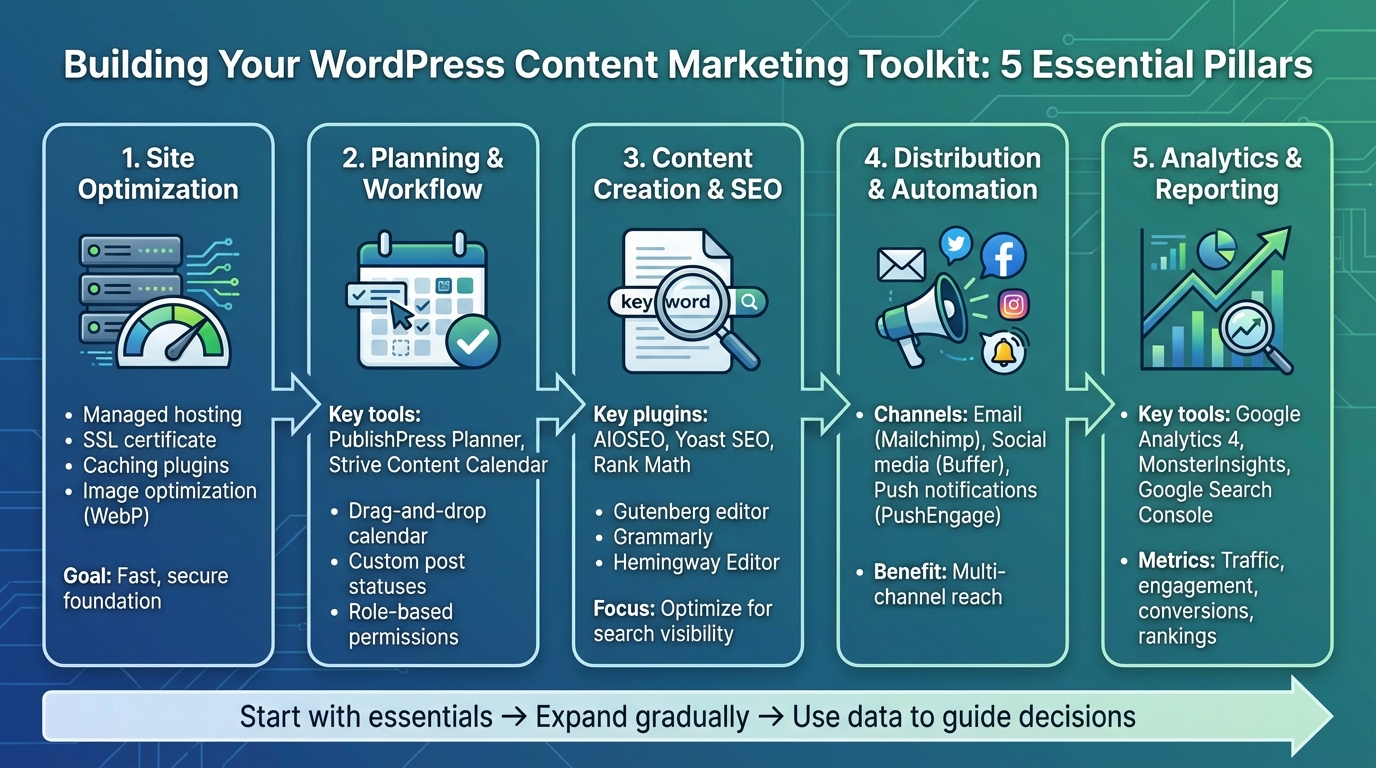
To create an effective content marketing toolkit, you’ll need tools that seamlessly integrate with site optimization, workflow management, and analytics. A solid WordPress content marketing system is built on five essential pillars: site optimization, planning, content creation & SEO, distribution, and analytics. Each plays a distinct role in ensuring your strategy runs smoothly:
- Site optimization: Hosting and performance plugins keep your site fast and secure.
- Planning: Editorial calendars and workflow tools help organize and assign content.
- Content creation & SEO: Plugins like AIOSEO or Yoast ensure your posts are optimized for search engines.
- Distribution: Email and social scheduling tools make it easy to share your content.
- Analytics: Platforms like Google Analytics, paired with tools like MonsterInsights, provide insights to refine your strategy.
The best content marketers start with clear goals, whether that’s growing an email list, increasing sales, or establishing thought leadership. From there, they choose one or two tools for each pillar that align with their objectives. Instead of installing every available plugin, focus on a few well-integrated tools that won’t slow your site or cause conflicts. Site speed and security should always be top priorities, as they directly impact SEO and conversions. Implementing analytics early is also critical – it ensures your decisions are based on real data rather than assumptions. These pillars work together to create a streamlined content strategy that supports growth and long-term success.
As your site grows, expand your toolkit gradually. Early on, invest in essentials like managed hosting, a core SEO plugin, and free or low-cost analytics tools. Once you’re consistently publishing and building an audience, consider adding editorial workflow tools, push notifications (like PushEngage), and advanced email automation. As your needs evolve further, premium keyword research platforms and deeper analytics can help you optimize high-performing content and uncover new opportunities.
Working with WP Support Specialists
To get the most out of your toolkit, WP Support Specialists offers a full range of services to help you implement and maintain it effectively. From setup to long-term maintenance, their team can handle every aspect of your WordPress content marketing system. They’ll design a tailored plugin stack, manage hosting to keep your site fast and secure, and offer maintenance plans starting at around $80/month to protect against security risks and operational hiccups.
Since WP Support Specialists focus exclusively on WordPress, they’re well-equipped to handle even the most complex integration challenges. Whether you need to connect your email service provider with custom post types, develop a custom plugin for automated content distribution, or optimize Core Web Vitals for better user experience and search rankings, they’ve got you covered. Their services include 24/7 emergency support, rapid response times, security audits, malware removal, and custom plugin development to add features that off-the-shelf tools might lack.
For agencies managing multiple client sites, WP Support Specialists also offer white-label partnerships. This allows you to deliver expert WordPress services under your own brand, simplifying vendor coordination and giving you a single, reliable point of contact for everything from plugin updates to performance optimization. By consolidating all your WordPress needs with one team, you’ll save time, reduce headaches, and ensure your site runs smoothly.
FAQs
What are the best ways to speed up my WordPress site?
To make your WordPress site faster, begin by fine-tuning your hosting setup. Choosing managed WordPress hosting can boost both speed and reliability. Next, focus on your images – compress them to reduce file sizes while maintaining quality. Adding a caching plugin can also help by cutting down load times. Be selective with plugins; stick to the ones you truly need and remove any extras. Lastly, keep your site secure and free of malware by performing regular maintenance and performance checks. These steps will ensure your site runs efficiently.
What are the top tools for managing an editorial workflow in WordPress?
Managing an editorial workflow in WordPress becomes much smoother when you use the right tools. Editorial calendar plugins such as CoSchedule or Edit Flow allow you to plan and schedule content directly within WordPress, keeping everything organized in one place. For more extensive content planning, tools like Trello or Asana are ideal for managing tasks and fostering collaboration among team members. On top of that, platforms like Google Workspace and Slack help streamline communication, ensuring everyone is aligned and working efficiently. Together, these tools can simplify the content creation process and boost your team’s productivity.
How can WP Support Specialists help improve my WordPress content marketing efforts?
WP Support Specialists take the technical burden off your shoulders, allowing you to focus entirely on creating and promoting your content. They handle everything from website design and SEO optimization to custom plugin development and ongoing maintenance, ensuring your WordPress site runs smoothly, securely, and efficiently.
By managing critical tasks like updates, security measures, and performance enhancements, they provide a solid foundation for your content marketing efforts. This means you can deliver a seamless user experience to your audience while steadily building and expanding your online presence.