

TLS encryption is fundamental for securing enterprise WordPress sites. It protects sensitive data – like customer details and payment information – by encrypting communication between servers and browsers. Without TLS, your site risks data breaches and diminished user trust. Here’s what you need to know:
- TLS Basics: Encrypts, authenticates, and ensures data integrity during transmission. TLS 1.3 is the latest version, offering faster and more secure connections than TLS 1.2.
- Why It Matters: 84% of users avoid non-secure sites, and HTTPS is a must for SEO and compliance (e.g., PCI standards). By 2025, nearly 96% of top websites will default to HTTPS.
- Implementation Steps:
TLS not only safeguards your WordPress site but also boosts performance with features like HTTP/2 and session resumption. Learn how to implement these measures effectively to ensure both security and speed.
Let’s Encrypt Tutorial: Free SSL Certificate For Your Server
Selecting and Installing TLS Certificates
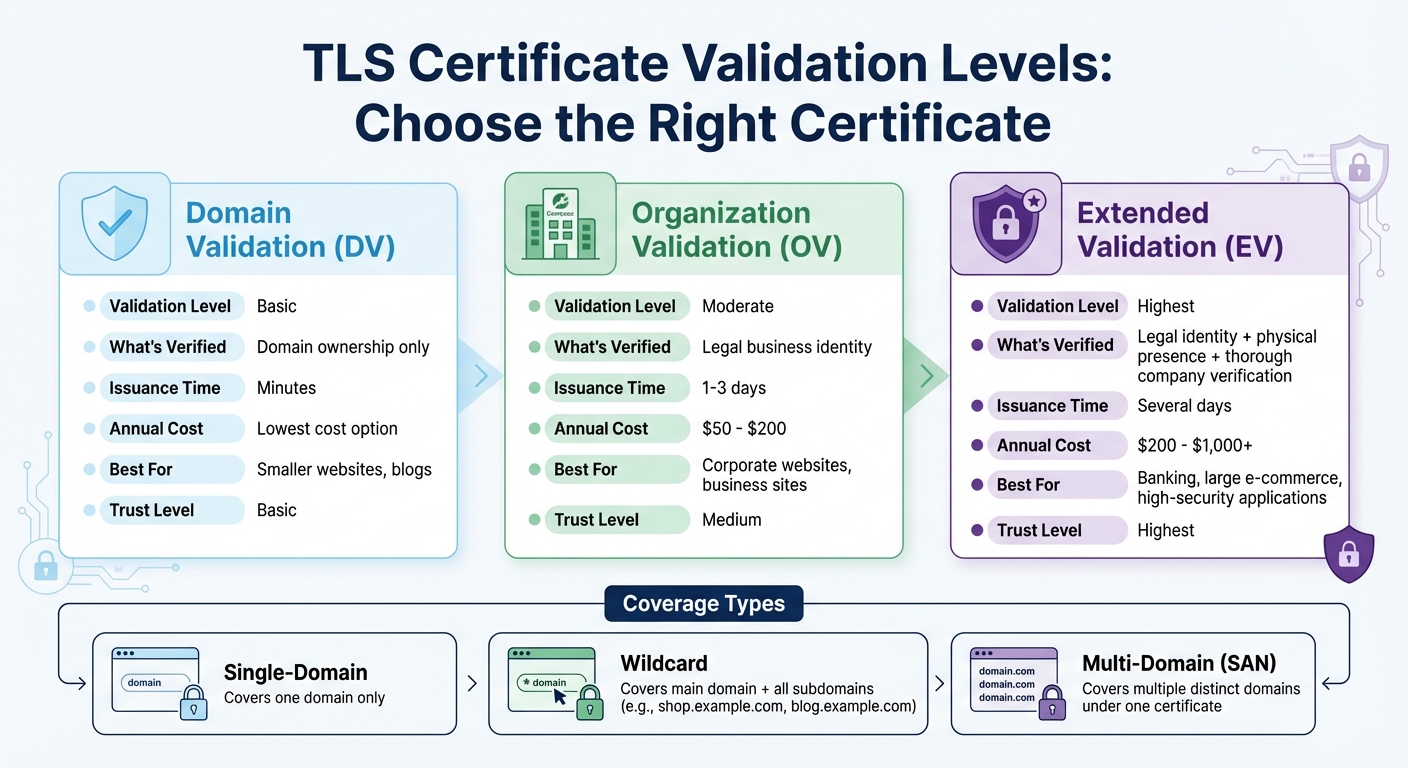
TLS Certificate Types Comparison: Validation Levels and Costs for Enterprise WordPress
Types of TLS Certificates
TLS certificates fall into two key categories: validation level and coverage type. When it comes to validation, you have three options: Domain Validation (DV), Organization Validation (OV), and Extended Validation (EV).
- Domain Validation (DV) certificates confirm domain ownership and are issued quickly, often within minutes. These are ideal for smaller websites that don’t require a high level of trust.
- Organization Validation (OV) certificates verify the legal identity of your business. These certificates typically cost between $50 and $200 per year and are the go-to choice for corporate websites.
- Extended Validation (EV) certificates involve more thorough checks, including verifying your company’s legal and physical presence. With prices ranging from $200 to over $1,000 annually, they are best suited for high-security applications like banking or large e-commerce platforms.
For coverage, your choices include single-domain, wildcard, and multi-domain (SAN) certificates.
- Wildcard certificates cover a main domain and all its subdomains (e.g.,
shop.example.com,blog.example.com) under a single certificate, making them a practical option for complex setups. - Multi-domain certificates (SAN) allow you to secure multiple distinct domains, which is particularly useful if you manage several brand sites using a single infrastructure.
How to Obtain a TLS Certificate
To get a TLS certificate, start by generating a Certificate Signing Request (CSR) and private key. This can be done through your hosting dashboard or by using OpenSSL. The CSR includes the details your Certificate Authority (CA) – such as DigiCert, Sectigo, or GlobalSign – needs to issue your certificate.
For OV and EV certificates, you’ll need to provide additional documentation to prove your organization’s legal identity. This might involve submitting business registration papers, completing phone verification, or confirming a physical address. Once the CA approves your request, they’ll issue your certificate files.
If you’re using Nginx, you’ll need to combine the primary and intermediate certificates into a single chained file. For Apache, these certificates are handled separately.
With your certificate files in hand, you’re ready to install them on your web server.
Installing TLS Certificates on Web Servers
The next step is applying your certificate files to your web server. For Apache, update your virtual host configuration by adding directives for SSLEngine, SSLCertificateFile, SSLCertificateKeyFile, and SSLCertificateChainFile. If you’re using Nginx, include listen 443 ssl in your server block and specify the chained certificate file and private key.
Before making any changes, back up your site and database to prevent data loss. After installation, update the WordPress Address and Site Address in the General Settings to use https://. Additionally, set up a 301 redirect at the server level to ensure all traffic is routed through HTTPS.
Finally, test your setup using SSL Labs to confirm everything is working as it should. Aim for an A+ rating to ensure your site is properly secured.
Configuring and Enforcing TLS in WordPress
Configuring Web Servers for TLS
To set up TLS on your web server, you’ll need to adjust configurations based on the server you’re using. For Apache, enable the mod_ssl module and define a <VirtualHost *:443> block with these directives: SSLEngine on, SSLCertificateFile, and SSLCertificateKeyFile. For Nginx, create a server block with listen 443 ssl and specify the paths for ssl_certificate and ssl_certificate_key.
Modern setups should prioritize TLS 1.2 and TLS 1.3, while disabling older protocols like SSLv2, SSLv3, TLS 1.0, and TLS 1.1. Enabling TLS also allows you to take advantage of HTTP/2, which boosts WordPress performance through connection multiplexing. For Apache, include Protocols h2 http/1.1; for Nginx, use listen 443 ssl http2;.
To further optimize, enable OCSP stapling by adding SSLUseStapling on to your Apache configuration. This ensures your server provides certificate revocation details during the handshake, cutting down on latency for visitors.
Once your server is configured for TLS, the next step is enforcing HTTPS across your WordPress site.
Enforcing HTTPS Across Your Site
After configuring your server, secure your WordPress site by enforcing HTTPS at the application level. Begin by updating your site URLs in Settings > General or directly in the wp-config.php file:
define('WP_HOME', 'https://yourdomain.com'); define('WP_SITEURL', 'https://yourdomain.com'); Next, set up 301 redirects to ensure all HTTP traffic is permanently redirected to HTTPS. For Apache, add the following to your .htaccess file:
RewriteEngine On RewriteCond %{HTTPS} off RewriteRule ^(.*)$ https://%{HTTP_HOST}%{REQUEST_URI} [L,R=301] For Nginx, configure a server block like this:
server { listen 80; server_name yourdomain.com; return 301 https://$host$request_uri; } To avoid mixed content warnings, update all hardcoded internal links in your database from http:// to https://. For large databases, use WP-CLI:
wp search-replace 'http://example.com' 'https://example.com' --skip-columns=guid Finally, secure admin sessions by adding this line to your wp-config.php:
define('FORCE_SSL_ADMIN', true); Setting Up HSTS and Security Headers
Once HTTPS is enforced, you can further protect your site by configuring HSTS (HTTP Strict Transport Security) and other security headers.
HSTS ensures browsers only communicate with your site over HTTPS, mitigating risks like protocol downgrade attacks and man-in-the-middle threats. HSTS requires three key settings:
max-age: Specifies how long browsers should enforce HTTPS.includeSubDomains: Extends the policy to all subdomains.preload: Signals readiness for inclusion in browser preload lists.
Start with a short max-age value (e.g., 300 seconds) to test your setup. Once verified, increase it to one year (31,536,000 seconds). For Apache, add this directive:
Header always set Strict-Transport-Security "max-age=31536000; includeSubDomains; preload" For Nginx, include:
add_header Strict-Transport-Security "max-age=31536000; includeSubDomains; preload" always; "Although our systems prefer the HTTPS version by default, you can also make this clearer for other search engines by redirecting your HTTP site to your HTTPS version and by implementing the HSTS header on your server."
- Zineb Ait Bahajji, Google Security Team
In addition to HSTS, configure other essential headers for added protection:
X-Content-Type-Options: nosniff: Prevents MIME-type sniffing.X-Frame-Options: SAMEORIGIN: Guards against clickjacking.
You can verify your headers using tools like SSL Labs, securityheaders.io, or hstspreload.org. With over 95% browser support for HSTS in the United States, this is a critical step for securing enterprise WordPress sites.
For expert help with these configurations or to ensure your WordPress hosting delivers strong TLS encryption and security, consider reaching out to WP Support Specialists (https://wpsupportspecialists.com). Their team offers tailored solutions, including security audits and performance tuning.
sbb-itb-976b402
Advanced TLS Security for Enterprise WordPress
Encrypting WordPress Databases and Backups
TLS is excellent for securing data in transit, but when it comes to stored data and backups, 256-bit AES encryption is the gold standard. This level of encryption ensures that sensitive information remains protected even when it’s not actively being transmitted.
In enterprise WordPress environments, TLS safeguards the connection between the WordPress application and its database, ensuring that internal communications between infrastructure components are secure. To further reduce risks, automated backups that are encrypted eliminate vulnerabilities often introduced by manual handling. For instance, WordPress VIP keeps production database backups encrypted for 30 days. A 2022 study revealed that 74% of data breaches were linked to human error.
"We’re really pleased with WordPress VIP’s commitment to cybersecurity and the way [it] stores [its] data and all the various checks and balances to keep somebody from being able to get access to our site." – Lead UX Designer, WordPress VIP
Encrypting stored data is just one part of the equation. Keeping a close eye on TLS configurations is equally critical. Here’s a quick look at how layered security measures work together:
| Security Layer | Protocol/Standard | Purpose |
|---|---|---|
| Data in Transit | TLS 1.3 / 1.2 | Encrypts communication between browser, server, and database |
| Data at Rest | 256-bit AES | Encrypts stored database files and backup archives |
| Identity Verification | SSL/TLS Certificates | Authenticates the server’s identity to the client |
| Policy Enforcement | HSTS | Forces browsers to use secure HTTPS connections only |
Monitoring and Auditing TLS Configurations
Once stored data is secured, the next step is to continuously monitor and audit your TLS configurations. This helps prevent vulnerabilities from creeping in and ensures your security measures stay effective. Regular checks, such as using the Qualys SSL Labs SSL Server Test, can confirm protocol support and cipher strength. Perform these tests monthly or after any server updates.
Compliance with standards like SOC 2, ISO 27001, and HIPAA requires maintaining immutable audit logs of administrative actions and login attempts. Beyond infrastructure-level monitoring, you should also track WordPress-specific activities, such as failed logins or suspicious database queries. Plugins like WP Activity Log can help with this.
Managing SSL/TLS certificates is another crucial piece. With 88% of websites expected to use HTTPS by June 2025, expired certificates could lead to unnecessary downtime. To avoid "connection not private" errors, enable auto-renewal for your certificates and monitor their validity using your hosting dashboard or security plugins.
For optimal security configurations, tools like the Mozilla SSL Configuration Generator provide recommended cipher suite strings for Nginx or Apache. These strings balance strong security with compatibility across devices. If you’re deploying HSTS, start with a low max-age value to test for issues, then gradually increase it to the standard 63,072,000 seconds (approximately 2 years).
"Transport Layer Security (TLS), formerly known as Secure Sockets Layer (SSL), is a protocol used by applications to communicate securely across a network, preventing tampering with and eavesdropping on email, web browsing, messaging, and other protocols." – Mozilla Developer Network (MDN)
Optimizing TLS Performance
Securing your enterprise WordPress site with TLS doesn’t have to mean slowing it down. While a full TLS handshake can add anywhere from 250 to 500 milliseconds of latency before any data is exchanged, there are ways to minimize this delay without compromising security.
"The primary performance problem with the TLS handshake is not how long it takes, it is when the handshake happens… The browser is blocked from getting that first HTML response." – Billy Hoffman, Technical SEO Expert, Moz
One of the best steps you can take is upgrading to TLS 1.3. This version reduces the handshake process from two round trips to one, and for returning visitors, it can even achieve 0-RTT, allowing data transmission to start immediately. Another effective strategy is session resumption. By using session tickets or identifiers, clients can reuse previously negotiated security parameters, significantly cutting handshake time. For load-balanced environments, session tickets are often ideal since they let the client handle session state. These adjustments help maintain fast, secure connections.
Let’s dive into some specific techniques to reduce handshake latency and strike the right balance between security and speed.
Reducing TLS Handshake Latency
Enabling OCSP stapling is a simple way to speed up certificate verification, cutting down latency during the handshake.
"OCSP stapling represents a significant advancement in how SSL Certificates validate their current status, offering improved performance and security for websites." – Trustico
Other optimizations include enabling TLS False Start and minimizing your certificate chain. With TLS False Start, clients can begin sending data before the handshake fully completes, as long as forward-secret cipher suites are in use. Additionally, bundling intermediates with your server certificate reduces delays caused by long certificate chains. For even greater performance, leveraging hardware acceleration like AES-NI can make encryption and decryption much faster.
Balancing Security and Speed
Optimizing beyond the handshake ensures security enhancements don’t come at the cost of performance. Modern AEAD ciphers, such as AES-GCM and ChaCha20-Poly1305, offer fast, authenticated encryption. ChaCha20 is especially useful for mobile devices or systems without hardware AES support. For key exchanges, Elliptic Curve Diffie-Hellman (ECDHE) is a better choice than RSA. A 256-bit ECDSA key provides 128 bits of security with much lower computational overhead compared to a 3,072-bit RSA key.
To further enhance performance, enable HTTP Strict Transport Security (HSTS) with a long max-age value to eliminate redirect latency. Avoid domain sharding under HTTPS, as it triggers multiple TLS handshakes. Instead, use HTTP/2 or HTTP/3, which support multiplexing and allow multiple files to be sent over a single connection.
"The latest versions of TLS hardly impact web application performance at all." – Cloudflare
If you want expert help in implementing these TLS optimizations and securing your enterprise WordPress site, WP Support Specialists can provide tailored solutions to meet your needs.
Conclusion
Securing your enterprise WordPress site with TLS encryption is essential for safeguarding sensitive information and earning user trust. By 2025, an impressive 95.8% of the top 1,000 websites will default to HTTPS, and 84% of users are likely to abandon a purchase if they find a site lacking proper security measures. Here’s how to implement TLS effectively.
Start by following three key steps: choose the right TLS certificate, install it, and enforce HTTPS across your site. To secure all dashboard sessions, add define('FORCE_SSL_ADMIN', true); to your wp-config.php file. Additionally, set up 301 redirects directly at the server level instead of relying on plugins, which helps minimize resource usage.
For a more robust security setup, consider advanced configurations. Enable HSTS to guard against SSL stripping attacks, use tools like SSL Labs to ensure an A+ security rating, and automate certificate renewals to prevent unexpected disruptions. While TLS protects data in transit, achieving comprehensive security requires additional measures. Incorporate tools like a Web Application Firewall, enable multi-factor authentication, and maintain encrypted backups as part of a thorough defense strategy.
"HTTPS is only a small part of WordPress security… It does not protect your website like a WordPress firewall, or make it more secure." – Robert Abela, Melapress
This guide has outlined both the basics and advanced steps for implementing TLS while maintaining performance. For professional assistance with TLS setup and broader WordPress security, consider reaching out to WP Support Specialists (https://wpsupportspecialists.com). Their services include security audits, hosting optimization, and ongoing maintenance to keep your site secure and running smoothly.
FAQs
What’s the difference between DV, OV, and EV TLS certificates?
TLS certificates are categorized into three main types, each providing varying levels of validation and trust:
- Domain Validation (DV): This type focuses on confirming domain ownership. It ensures basic encryption and is a good fit for personal websites or blogs where minimal trust indicators are sufficient.
- Organization Validation (OV): Along with verifying domain ownership, OV certificates confirm the organization’s legal identity. This additional verification makes them suitable for small businesses or websites that need to establish a moderate level of trust.
- Extended Validation (EV): EV certificates involve the most rigorous validation process, verifying the organization’s legal and physical existence. These certificates include prominent trust markers, like displaying the company name in the browser’s address bar, making them ideal for e-commerce sites and financial institutions.
The choice of certificate should align with your website’s goals and the degree of trust you want to establish with your visitors.
How can I make sure my WordPress site is fully secured with HTTPS?
To make your WordPress site fully HTTPS compliant, begin by installing a reliable SSL/TLS certificate through your hosting provider or a certificate authority. Next, update both the Site Address and WordPress Address in your WordPress settings to use https. To enforce HTTPS across your site, you can either modify your .htaccess file or use a security plugin. Lastly, check your site for mixed content – any resources still loading over http – and update those links to https to eliminate browser warnings and ensure your site is secure.
How can I improve TLS performance for my enterprise WordPress site without compromising security?
To boost TLS performance without compromising security, start by enabling only TLS 1.2 and TLS 1.3 while disabling outdated protocols like SSL v2/v3 and TLS 1.0/1.1. These updated versions not only enhance security but also improve speed by minimizing handshake delays. Opt for a modern cipher suite with AEAD algorithms, such as AES-GCM or ChaCha20-Poly1305, and implement OCSP stapling to streamline certificate validation. Also, enable HTTP Strict Transport Security (HSTS) to ensure browsers consistently use secure connections and skip unnecessary redirects.
For better infrastructure performance, consider using a CDN or edge cache to terminate TLS closer to your users, cutting down on latency. Configure the CDN to reuse TLS sessions with session tickets or IDs and ensure support for HTTP/2 or HTTP/3, which offer faster, multiplexed connections. Regularly check for TLS vulnerabilities to keep your setup secure and up-to-date. These adjustments provide strong security while delivering the fast, reliable experience users demand.