

When it comes to maintaining a WordPress website, performance is everything. Whether you’re managing your own site or supporting clients as part of a digital agency, ensuring that your site’s speed and efficiency are running at their best is critical for user satisfaction and search rankings. In this article, we explore PHP Vitals, a powerful plugin designed to help WordPress professionals assess and improve their site server’s PHP performance. This tool provides valuable insights into server health, enabling you to troubleshoot bottlenecks and optimize for speed – all without technical headaches.
Let’s dive into what PHP Vitals is, how it works, and how you can use it to your advantage.
The Importance of PHP Performance in WordPress

PHP serves as the backbone of WordPress, powering everything from dynamic content rendering to plugin functionalities. However, not all hosting environments are created equal. Aging servers or mismanaged hosting setups can lead to slow load times, poor database interactions, and a frustrating user experience. This is where PHP Vitals steps in – offering a practical, user-friendly way to benchmark and diagnose your server’s PHP performance.
Why PHP Matters for Site Speed
- Core Operations: PHP handles fundamental operations like database queries, form submissions, and dynamic content generation.
- Plugin and Theme Compatibility: Outdated PHP versions can cause compatibility issues with newer plugins and themes.
- SEO and User Retention: Website speed is a crucial ranking factor for search engines, and slow websites deter users from staying.
By regularly monitoring your PHP performance, you can preempt issues before they impact your website’s functionality and reputation.
sbb-itb-976b402
What is PHP Vitals?
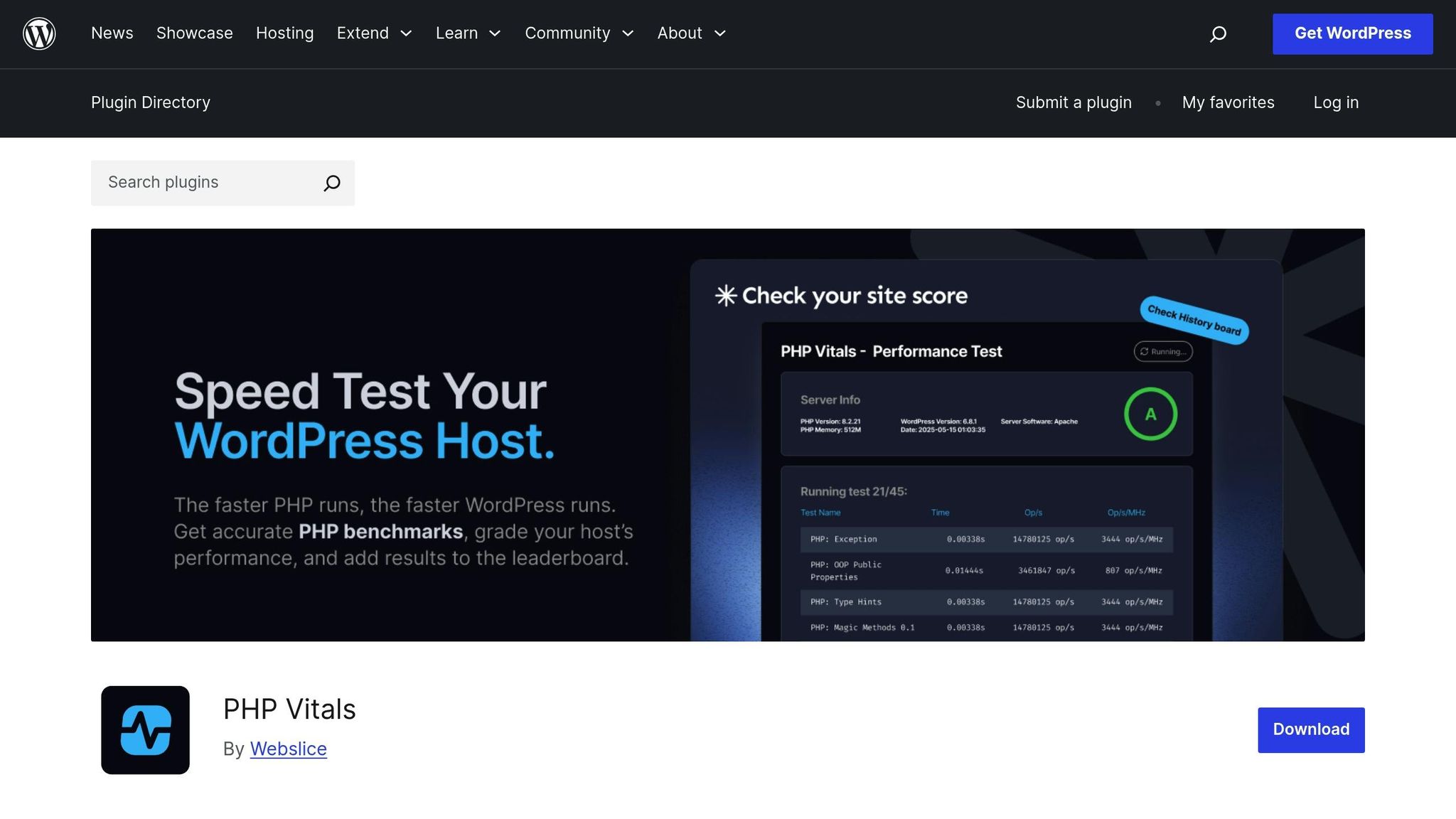
PHP Vitals is a lightweight WordPress plugin designed to benchmark your server’s PHP performance. It provides clear metrics and allows you to determine whether your site’s hosting environment is optimized for efficiency. Unlike overly technical tools, PHP Vitals focuses on simplicity, making it accessible even for non-developers.
Core Features of PHP Vitals
- Server Benchmarking: The plugin runs a series of tests to evaluate your server’s PHP capabilities, providing a grade (e.g., A, B, or C).
- Insights into Key Metrics: It analyzes factors like memory usage, execution time, and database interaction to pinpoint performance weak points.
- Stress Testing: Helps simulate high traffic scenarios to see how your server handles increased demand.
- Actionable Recommendations: If your site scores poorly, PHP Vitals guides you toward solutions, such as upgrading your hosting environment or optimizing your PHP configuration.
How to Use PHP Vitals Step-by-Step
1. Install and Activate the Plugin
- Navigate to your WordPress dashboard.
- Search for "PHP Vitals" in the plugin repository.
- Install and activate the plugin as you would any other WordPress plugin.
2. Access the Plugin Settings
- Once activated, PHP Vitals will appear in your WordPress admin menu.
- Click on its menu item to access the plugin interface.
3. Run a Benchmark Test
- From the plugin dashboard, initiate a benchmark test.
- The test runs through 29 detailed scenarios to evaluate different aspects of your server’s performance, such as memory allocation, database queries, and public properties.
4. Analyze Your Results
- PHP Vitals provides you with an overall score (A, B, C, etc.), as well as detailed breakdowns of individual metrics.
- If you score C or above, your server is performing adequately. Scores below C indicate areas that need immediate attention.
5. Take Action Based on Results
- For low scores, consider the following:
- Upgrade to a newer hosting environment with more up-to-date PHP configurations.
- Consult with your hosting provider to optimize server settings.
- Monitor traffic and adjust server resources as needed.
Practical Benefits of PHP Vitals
1. Identify Server vs. Website Issues
One of the plugin’s standout features is its ability to differentiate between server-related and website-related performance problems. For example, if your benchmark score is low, the issue likely lies in your hosting setup.
2. Simplify Troubleshooting
Instead of digging through complex logs, PHP Vitals distills vital information into easy-to-understand reports. This reduces the time and expertise needed to diagnose performance issues.
3. Aid in Hosting Decisions
Hosting providers often promise stellar performance, but not all deliver. PHP Vitals allows you to independently verify your hosting provider’s claims, ensuring you’re getting what you pay for.
4. Support for Ongoing Optimization
The plugin isn’t just a one-time tool – it can be a part of your regular maintenance routine. By running periodic tests, you can monitor long-term server health and respond proactively to performance dips.
Additional Insights: Server Age and Hardware
While PHP Vitals focuses on software performance, it’s essential to remember that server hardware also plays a major role. Older servers may struggle to deliver modern PHP performance, so upgrading to newer hardware or a premium hosting solution can significantly improve your benchmarks. Regularly updating server hardware ensures compatibility with newer technologies and plugins.
Key Takeaways
- PHP is the backbone of WordPress: Your site’s performance, plugin compatibility, and SEO rankings depend on robust PHP functionality.
- PHP Vitals is an easy-to-use plugin: It simplifies server benchmarking, making it accessible to WordPress users of all skill levels.
- Benchmark tests are crucial: Use PHP Vitals to grade your server performance and identify bottlenecks.
- Actionable insights save time: The plugin offers clear recommendations, helping you resolve issues without technical guesswork.
- Optimize your hosting environment: If your server scores poorly, consider upgrading to more modern hardware or consulting your host for adjustments.
- Regular testing improves long-term performance: Incorporate PHP Vitals into your website maintenance schedule to ensure your server stays ahead of the curve.
Conclusion
In today’s competitive online landscape, website performance can make or break your success. Tools like PHP Vitals empower WordPress users to take control of their server health, delivering faster load times, happier users, and improved search rankings. Whether you’re an entrepreneur or part of a digital agency, integrating PHP performance monitoring into your workflow is a smart, forward-thinking move.
By taking advantage of PHP Vitals, you’ll be armed with the insights needed to ensure your website operates at peak efficiency – providing a seamless experience for your visitors and clients alike. Start optimizing today, and make slow-loading websites a thing of the past.
Source: "Boost Your WordPress Speed: with Quintin Russ on PHP Vitals & Developer-First Hosting, Interview 73" – WordPress Plugins from A to Z, YouTube, Aug 11, 2025 – https://www.youtube.com/watch?v=Q86c6eAXHwQ